98PKR Game APK Best Online Earning App Download in Pakistan
10/6/2026
5.9MB
V1.3
Android 5+
7261+

Description
98PKR Game brings different game collections and account tools together in a purple, mobile-focused interface. The home screen includes featured titles, provider sections and shortcuts to the main areas.
For new users, understanding the layout helps make sense of the platform. This guide explains its categories, registration form, missions, profile settings and support options in simple English.
The guide is for adults aged 18 and above. Reward banners describe platform offers; they do not prove reliable income or actual payouts. You may Also Try V44 game.
What Is 98PKR Game?
98PKR game is a platform with themed game collections, fishing, cards, live entries and sports sections. It organizes content through both categories and provider names, giving users two ways to browse the library.
Alongside the games, the interface includes Event, Mission, VIP, Invite and Message Center pages. Each area handles a different part of the platform, from activity information to account tools and notices.
Dashboard and Main Navigation
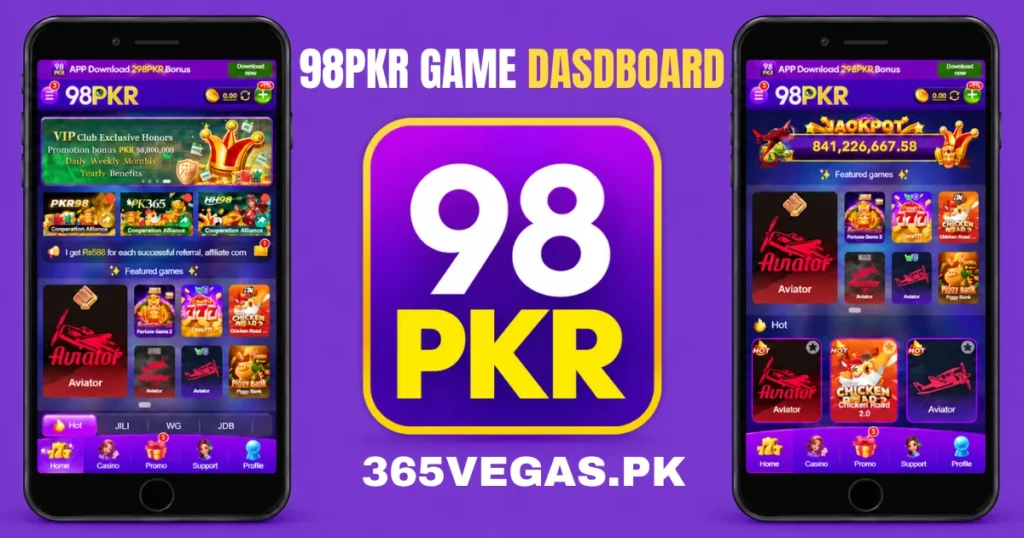
The dashboard places the logo and menu icon near the top, beside Login and Register buttons. An app-download banner sits above them. Below the header, users can see rotating banners, cooperation cards, announcements and featured games.
The bottom navigation connects Home, Casino, Promo, Support and Profile. A TOP control also appears in some views. Provider collections continue farther down the page, so browsing the full library requires scrolling.
Featured Titles and Hot Games
The featured area gives Aviator a larger card alongside titles such as Fortune Gems 2, Crazy777, Chicken Road and Piggy Bank. The Hot collection also shows Money Coming, Super Ace, Fortune Garuda 500 and other entries.
These labels help organize the dashboard. A Hot tag does not establish better results or an independently verified popularity ranking.
98PKR Game Categories
Mini Games
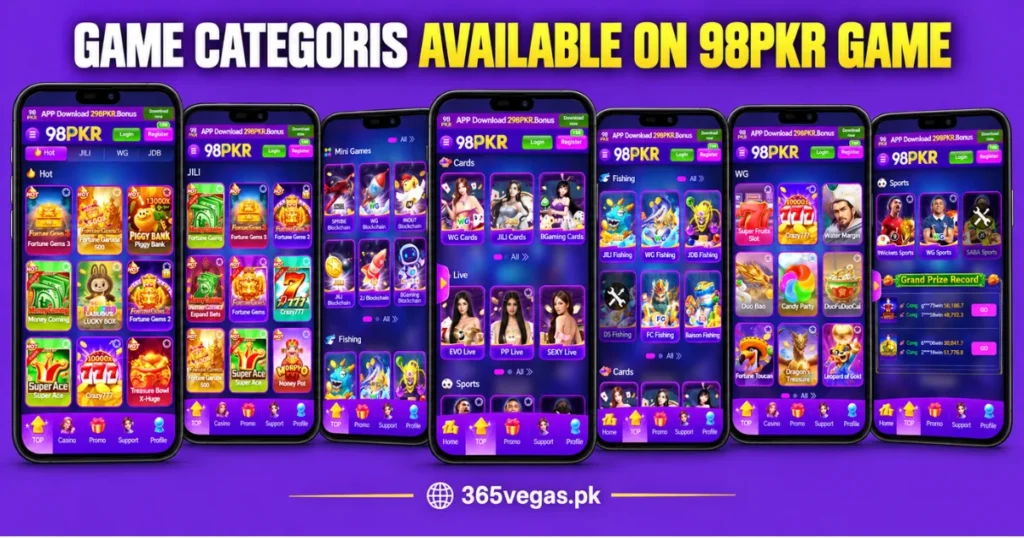
Mini Games displays provider collection cards, including SPRIBE, WG, INOUT, JILI, 2J and BGaming. Several labels include the word “Blockchain,” but the label alone does not verify the technology behind a game.
Fishing
The Fishing section includes JILI Fishing, WG Fishing, JDB Fishing, DS Fishing, FC Fishing and Baison Fishing. Each card identifies a separate provider collection within the same category.
Cards
WG Cards, JILI Cards and BGaming Cards appear in this section. The overview identifies the collections, while the individual titles and their rules require a closer look inside each entry.
Live
The Live section includes EVO Live, PP Live and SEXY Live. These collections sit separately from the other game grids. Availability and session details depend on the individual entry.
Sports
Sports displays 9Wickets Sports, WG Sports and SABA Sports. Sports-themed artwork also appears elsewhere in the library, so an individual title’s image does not always identify its category.
Provider Collections of 98PKR game
Provider sections group games under a displayed brand. For example, JILI includes Money Coming and Super Ace, while PG includes Fortune Rabbit and Lucky Neko.
| Provider | Visible examples |
|---|---|
| JILI | Money Coming, Fortune Gems 3, Super Ace |
| WG | Crazy777, Water Margin, Candy Party |
| JDB | Piggy Bank, Mines, Open Sesame |
| PG | Fortune Rabbit, Wild Bounty Showdown, Lucky Neko |
| PP | Gates of Olympus, Fire Strike 2, Chicken Chase |
| 2J | Lucky Box, Fortune Mouse, 777 Fruit |
| FC | Night Market, Fortune Koi, Animal Racing |
| Dragon Soft | Diamond Mogul, Get Money, Zeus |
| MG | Wacky Panda, Aurora Wilds, 9 Masks of Fire |
| Big Time Gaming | Apollo Pays, Extra Chilli, Bonanza |
This table describes the visible library. Provider logos do not independently confirm licensing or a verified partnership.
Game Cards and Status Icons
Game cards combine artwork, titles and small indicators. Many display star icons, while some sections include page dots and an “All” control. These suggest additional browsing or saving options, but their exact behavior needs checking.
Some entries, including the Dragon Soft collection, DS Fishing and SABA Sports, have dark overlays with crossed-tool symbols. The screen does not explain the symbol, so check notices or support before assuming what it means.
Events, Missions and Reward Conditions
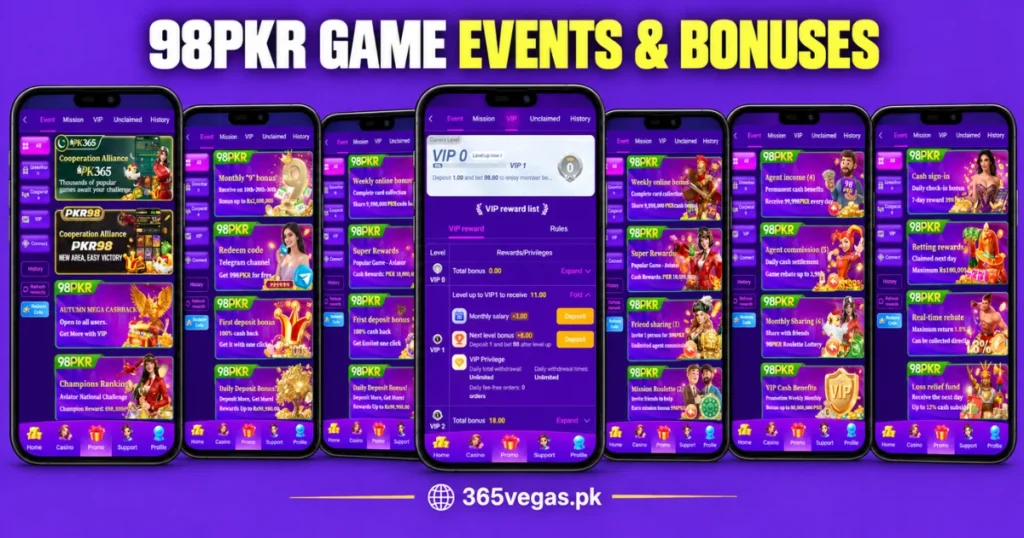
The Promo area separates Event, Mission, VIP, Unclaimed and History into tabs. Event also includes filters such as All, Greenhorn, Cooperate, VIP and Connect, plus a Redeem Code control.
Mission provides Newplayer, Daily Mission, Weekly Mission and Mystery Mission tabs. The visible new-user tasks cover registration, SMS verification and app login with a first-deposit condition. Each task has its own figures and Go button.
Read the detailed conditions before interpreting any reward amount. Check eligibility, deadlines and required activities, and distinguish a displayed offer from an amount actually claimed.
Daily Check-In on 98PKR game
Daily Check-In appears in Profile and in a separate Cash sign-in panel. The panel lists day-by-day amounts, a consecutive-day counter and a claimed total. Some days also carry an Extra Rewards label.
The bottom of the panel shows deposit and activity requirements. This means the listed amounts should not be described as unconditional rewards. Reminder controls affect whether the prompt appears; they do not remove its requirements.
VIP Levels and Rules
The VIP page shows the current level, progress and a reward list. The visible account sits at VIP 0, with information about moving toward VIP 1.
Expandable rows contain level-related amounts and privilege labels. A separate Rules tab provides the place to check conditions. The overview alone does not confirm faster withdrawals, fee exemptions or unrestricted account limits.
Login and App Download Options
- Find Login in the header, profile area or account-page tabs.
- The exact login fields and recovery options remain unconfirmed.
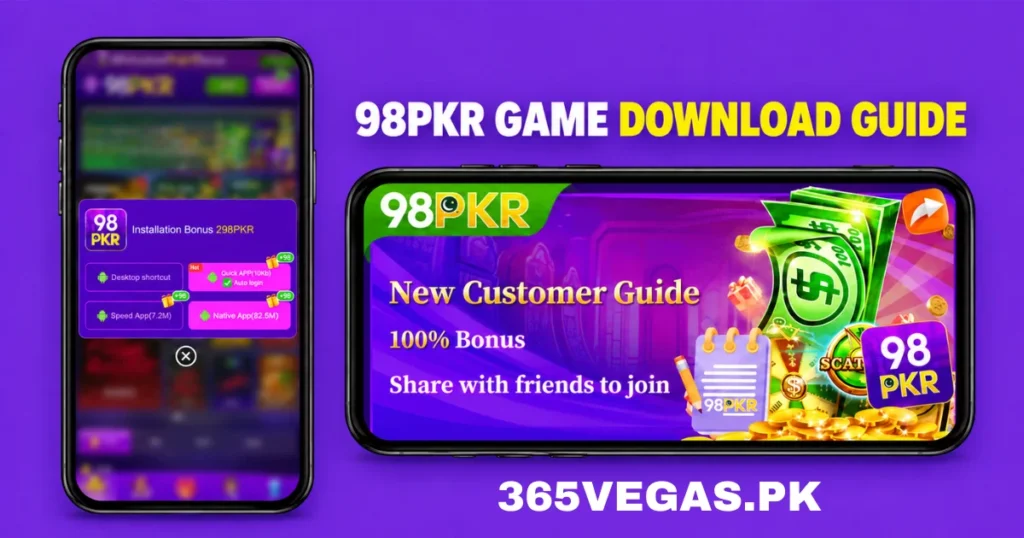
- The download screen lists Desktop shortcut, Quick APP, Speed App and Native App.
- Check the file source, publisher, version, size and device requirements before installation.
- Review requested permissions and keep device security protections active.
- Android APK files do not work on iPhones; a separate iOS app remains unconfirmed.
How to Register an Account
- Open Register and confirm the page identity before entering your details.
- Enter your phone number, email or profile information as the field instructs.
- A +92 prefix appears beside the input.
- Choose Password registration or Code register and follow the selected option’s instructions.
- For password registration, create a unique password and enter it again in the confirmation field.
- Read the User Agreement and check the eligibility requirements before accepting.
- Select Register and follow any verification instructions that appear next.
- Google, Facebook and Telegram icons appear under Binding registration, but their connection process remains unverified.
Profile Tools and Account Records
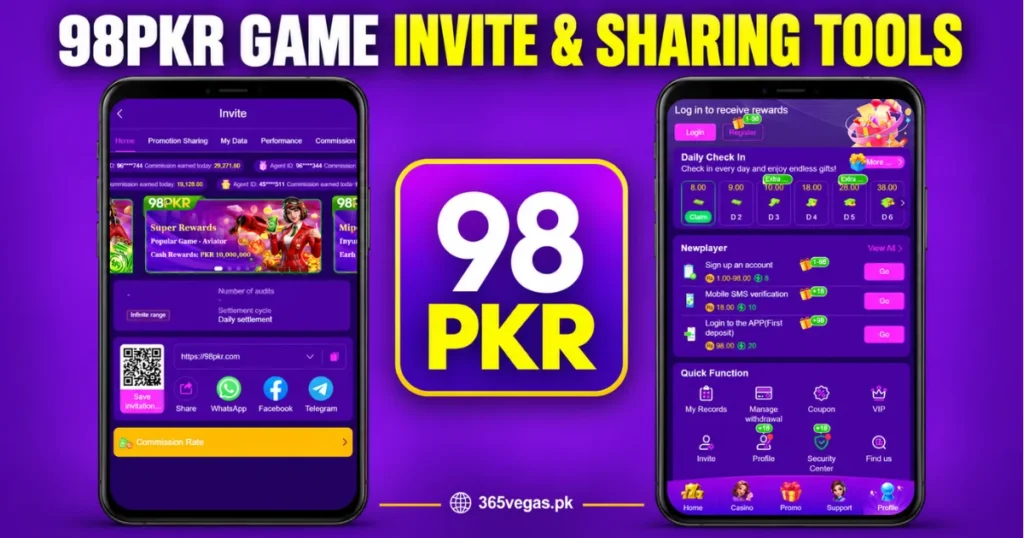
Profile combines Daily Check-In, new-user tasks and a Quick Function grid. Visible shortcuts include My Records, Manage Withdrawal, Coupon, VIP, Invite, Profile, Security Center and Find us.
My Records and Manage Withdrawal identify separate account areas. Their internal screens are not shown, so payment methods, minimum amounts, fees and processing times need checking within the relevant page. Easypaisa, JazzCash and bank transfers cannot be confirmed from these shortcuts.
Security Center and Privacy
Security Center appears as a profile shortcut. Open it to see which controls the platform provides; the name alone does not confirm two-factor authentication or device-management settings.
Use a unique password and keep verification codes private. Review application permissions before allowing access, and remove account numbers or other sensitive details from screenshots sent to support.
Invite and Sharing Tools
The Invite page contains Promotion Sharing, My Data, Performance and commission-related sections. It also displays a QR code, link field, copy control and sharing options for WhatsApp, Facebook and Telegram.
These tools describe how the invitation page works. Displayed commission figures do not verify actual payments. Read the associated rules before interpreting any amount or account qualification.
English and Urdu Settings
The Language dialog lists English and Urdu. Users can select a language and check whether the pages they need reflect that choice.
Translation coverage may differ between navigation, game titles and detailed rules. Provider names may remain unchanged even when surrounding menu text changes.
Message Center and Customer Support
Message Center contains Support, News, Notice and Marquee tabs. Notice includes search, dropdown filters, dates and Unread labels. These controls help users find and distinguish messages.
The Support page provides Online Service, social-channel entries and a Help Center search field. It advertises 24/7 assistance, although actual availability and response times have not been verified.
When reporting a problem, describe the affected section, the action you attempted and the exact error message. Share only the information needed to explain the issue.
Device Experience and Loading Problems
The narrow layout and bottom navigation suit mobile browsing. However, long collections need scrolling, and some titles wrap onto multiple lines. The design alone does not establish compatibility or performance on every device.
If a page fails to load:
- Check whether other websites open on the same connection.
- Reload once or reopen the application.
- Read any notices or error messages.
- Check available storage if a download or installation fails.
- Contact support with the error details if the issue continues.
Avoid submitting the same form repeatedly while its result remains unclear.
Advantages and Limitations
| Advantages | Limitations |
|---|---|
| Categories and provider sections organize the library. | Individual rules and availability need checking. |
| Profile groups account shortcuts in one place. | Several internal settings are not shown. |
| English and Urdu appear in the language menu. | Full translation coverage remains untested. |
| Notices include search and filters. | Message titles do not explain every condition. |
| Check-in panels display requirement counters. | Reward figures do not prove withdrawal availability. |
| Support and Help Center options are visible. | Response times and service quality remain unverified. |
Frequently Asked Questions
The interface includes Mini Games, Fishing, Cards, Live and Sports, alongside Hot and provider collections.
Yes. The Language dialog lists Urdu and English. Check individual pages for translation coverage.
The panel includes deposit and activity requirements. Read the detailed rules to understand eligibility.
The available view does not explain it. Check platform notices or ask support for clarification.
No. The supplied material does not establish verified file specifications or installation requirements.
No payment-method selection screen is included. The Manage Withdrawal shortcut does not confirm supported wallets or banks.
Final Thoughts
98PKR Game separates its game library from profile tools, missions and messages. Understanding these areas makes the interface easier to follow and helps readers locate the information they need.
Check the rules behind reward figures and account functions rather than relying on banner headlines. Application details, payment methods and security features still require separate verification.
Download links
How to install 98PKR Game APK Best Online Earning App Download in Pakistan APK?
1. Tap the downloaded 98PKR Game APK Best Online Earning App Download in Pakistan APK file.
2. Touch install.
3. Follow the steps on the screen.